Service

Sort the inbox
before it steals the day.

Incoming messages get sorted, prioritized, and handed off automatically so the team can focus on what matters first.

A strong first project for teams buried in shared inboxes, support channels, or mixed incoming requests.
Get the first-build recommendation
The Bottlenecks
Mixed queues

support, service, billing, and internal requests land in one pile

Manual triage

people still read and forward the same kinds of messages every day

Buried urgency

important requests disappear under routine inbox noise

Weak ownership

work gets assigned by whoever checks first instead of a clear rule

Inspectable proof build

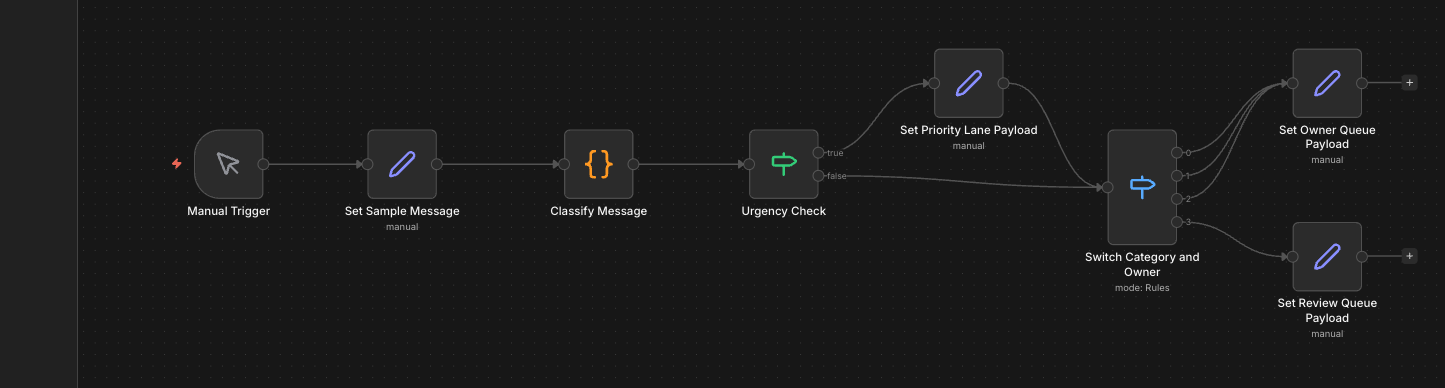
Inspect the inbox routing before the scope details.

The real n8n canvas and visible queue states land early, so buyers can judge the routing before the longer service detail.

n8n canvas for the Rivet Flow shared inbox triage proof workflow
Workflow teardown · anonymized

Shared inbox cleanup

The first build added sorting, urgency cues, owner routing, and a review lane around the current inbox and internal notifications.

Bottleneck

Support, service, and billing work was hitting the same queue, so the team had to read everything before deciding what actually mattered.

First shift

The queue stopped behaving like one pile.

Build note. The automation sat around the inbox already in use instead of forcing a new help-desk rollout.

The Process
01

A message comes in.

Email, a form, or an internal request lands in the queue. It gets captured from the channels your team already uses.

02

It gets sorted.

The system checks what kind of message it is, how urgent it feels, and who should deal with it next.

03

The right person gets it.

Urgent work gets surfaced, routine work gets filed properly, and the team sees clearer ownership from the start.

What changes in practice

The inbox stops feeling like one long pile.

Messages are grouped by type, urgency, and owner instead of staying mixed together.

The important work shows up first.

Priority rules surface what needs attention instead of forcing the team to read everything manually.

Handoffs become clearer.

Messages go to the right person, channel, or review queue based on your rules.

Before you ask about pricing
Usually live in about a week

A first inbox setup moves quickly when the categories and owners are already mostly known.

Works around the current inbox

The usual approach is to improve how work is sorted and handed off.

Human review stays available

If a message does not fit the rules cleanly, it can land in a review queue.

Good fit

A shared inbox, support queue, or internal channel already creates enough drag to feel expensive.

The team can explain the categories, urgency cues, and who should usually own each type of request.

You want cleaner ownership without forcing everyone into a new system overnight.

Not a fit yet

There is not enough message volume yet to justify building a real sorting layer.

The bigger problem is staffing or service-process design rather than how the inbox gets triaged.

Investment
$3,000-$5,000
Typical first build

A first setup for one inbox or shared channel, with sorting, priority rules, and clear ownership handoff.

Typical first build includes

Set up one inbox or channel with categories, urgency cues, and ownership rules

Route priority items to the right person or queue first

Keep a review path for messages that need a human decision

Above this range when

Custom quote when multiple inboxes or channels need to be merged, approval/reporting layers are required, or the queue is operationally sensitive.

Software and API costs stay separate. Optional support can be added after launch.

Get the first-build recommendation
Common questions
How long does this usually take? +
Most first inbox setups are live in about a week once we understand the categories, ownership rules, and current tools.
What kinds of inboxes does this work with? +
Gmail, Outlook, shared inbox tools, help desks, forms, and Slack channels are all common starting points.
Do we need a new help desk or a new inbox tool? +
Usually not. The first build is usually wrapped around the inbox, help desk, or channel you already use.
What happens when the system is unsure? +
Messages that do not fit the rules cleanly can be sent to a review queue.
Can we change the categories and owners later? +
Yes. The rules can be adjusted as your team changes, without redoing the whole setup.
Related insight

Shared inbox automation vs shared inbox software

Use this page if the real decision is product versus workflow layer.

Read the software comparison
Get the first-build recommendation

Tell us what needs fixing first.

One bottleneck, the current tools, and where work gets dropped is enough to start.

We reply within 1 business day with fit, the likely first build, and a realistic range.